


A Shopify store needs more than polished pages. Effective Shopify website design brings together the customer journey, brand identity, product content and essential features, then tests the store before launch. A professional build typically takes six to ten weeks from a completed brief to launch.
It’s reasonable to want a clear picture of what happens between the first conversation and a working online store. The process involves decisions about design, content and functionality, each of which can shape the result.
This guide covers the stages of a Shopify build, how to choose an approach that fits your business, and what affects the timeline and investment. It also explains how photography, written content and custom features help prepare a store to serve customers.
Key Takeaways
- Plan product copy, photography and any custom features as part of the build so the store feels cohesive and supports the customer journey.
- Choose a DIY, assisted or professional build based on the level of customisation and support your business needs.
- Make mobile usability and carefully optimised rich media part of the design, not an afterthought.
- Understand how scope, content, integrations and design complexity shape the investment before settling on an approach.
Content, photography and custom functionality
A Shopify build combines page layouts, product information, photography and store features. For example, apparel pages may need sizing details, clear images and product filters.
Theme Customisation and Bespoke Design
Theme customisation adapts an existing Shopify theme to your brand, products and customer journey. Bespoke design, by contrast, shapes page layouts around your business requirements. Before choosing, map out key pages, products and customer tasks, such as finding ingredients or comparing sizes. This makes it easier to weigh flexibility against a more tailored visual direction.
No-Code Editing and Custom Page Blocks in a Professionally Built Store
Shopify’s editing tools can be configured so your team can update agreed content without changing code. Custom page blocks might let staff rearrange a campaign banner, product details or FAQ section. Define which fields are editable and how each block behaves, so content managers can make routine updates while keeping layouts consistent.
Custom Themes and Headless Commerce
A custom theme gives a store a tailored storefront within Shopify’s theme structure. Headless commerce separates the storefront from the commerce back end, allowing a separately developed customer experience. The right option depends on design requirements, integrations and ongoing development capacity. For example, a brand with unusual product displays may need more control than a standard theme allows.
Choosing a Shopify Theme for an Australian Online Store
Choose a theme by matching its layouts and content features to your products and customer journey. For an Australian skincare business, that might mean prioritising clear product details, ingredient information and prominent purchase options. Also consider mobile layouts, navigation and how easy pages are to maintain. Product copy and photography should reinforce the same priorities, not compete for attention.
Customer research and content planning shape these choices before development begins. Shopify stores sell apparel, packaged food and drink, cosmetics and skincare, so product pages need content suited to each category. Photography can show scale, texture or use; Weston Table’s Shopify project, for example, included 300 pen-and-ink illustrations. A custom feature should solve a defined customer or operational need, not simply add another element.
DIY, assisted, and professional Shopify builds: what clients can expect
The build approach determines who handles setup, decisions and testing. A clear scope keeps each stage focused on getting the store ready to launch.
Planning, Discovery and Stages of a Professional Shopify Build
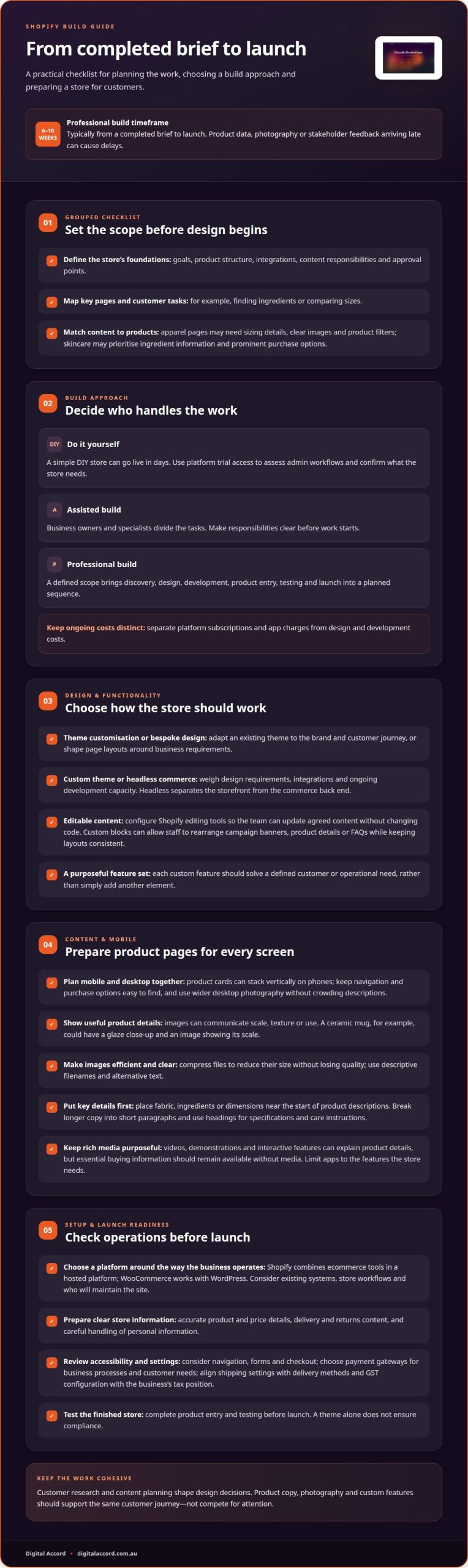
A professional Shopify build typically takes six to ten weeks from completed brief to launch. Discovery defines goals, product structure, integrations, content responsibilities and approval points. Design, development, product entry, testing and launch follow. Delays can occur when product data, photography or stakeholder feedback arrives late.
A simple DIY store can go live in days, while an assisted build divides tasks between business owners and specialists. Before work starts, use platform trial access to assess admin workflows and confirm what the store needs. Separate ongoing platform subscriptions and app charges from design and development costs to make responsibilities and recurring expenses clearer.
Platform, Compliance and Store Setup Decisions for a Professionally Built Shopify Store
Shopify and WooCommerce suit different operating preferences. Shopify combines ecommerce tools in a hosted platform, while WooCommerce works with WordPress. Consider your existing systems, store workflows and who will maintain the site. The better fit supports your operations without adding unnecessary complexity.
Australian stores should plan accurate product and price information, clear delivery and returns content, careful handling of personal information, and accessible navigation, forms and checkout. These design choices support consumer, privacy and accessibility responsibilities, but a theme alone does not ensure compliance. Choose payment gateways to suit business processes and customer needs. Shipping settings should reflect delivery methods, and GST configuration should align with the business’s tax position.
Define these decisions during discovery, before development locks in page structures or checkout settings. A professional Shopify build plan can help bring scope, responsibilities and launch stages together.
Responsive design and rich media
A responsive Shopify storefront adapts its layout to different screen sizes. On a phone, product cards can stack vertically rather than shrink. Navigation should stay clear, with menus and purchase options easy to find. A desktop layout can use wider product photography without crowding descriptions. Plan these views together to give customers a consistent journey across devices.
Product images should show useful details, not just brand styling. For a ceramic mug, include a close-up of the glaze and an image that shows its scale. Compress image files to reduce their size without losing quality, helping limit unnecessary loading while preserving detail customers need. Descriptive filenames and alternative text can also make page content clearer.
Product descriptions should be easy to scan on smaller screens. Put key details, such as fabric, ingredients or dimensions, near the start. Break longer copy into short paragraphs, with headings for specifications and care instructions. For example, an Australian apparel store can place size and material information beside product options, giving shoppers context before they choose a variant.
Rich media can include product videos, demonstrations or interactive features. A short clip showing how a kitchen appliance works may explain details that still images miss. Give each media element a clear purpose, and limit Shopify apps to the features the store needs, since extra integrations can add complexity. Keep essential product descriptions and buying information available without relying on media.
Before launch, test key pages on phones, tablets and desktop screens. Check that navigation, product options and descriptions remain readable at each size. Test links, forms and the full checkout journey, including delivery and payment steps. A phone test might reveal a button hidden below a large product image. Fix layout issues before launch, then review how new content appears across devices.
Shopify website design and development costs
A Shopify build’s investment reflects its scope, not just the storefront’s appearance. Pricing depends on the project and is provided after a quote request. Factors include page count, product migration, content preparation, integrations and custom development. A catalogue with straightforward product pages requires different work from a store with complex filters or tailored workflows.
Ask for a clear breakdown of the proposed work. Separate design and development from content entry, migration, testing and launch support. Distinguish project fees from ongoing platform, theme and app charges, too. For example, adding an inventory integration can involve setup and testing beyond visual design. The proposed scope should explain what each item covers.
Scope helps you compare approaches without treating them as identical. A theme refresh updates an existing storefront. A customised theme adds brand-specific layouts or features, while a bespoke build can involve more design and development work. Set priorities first: product discovery, checkout flow and essential integrations may matter more than decorative details.
Common risks include unclear scope, too many apps, incomplete product data and rushed testing. These can lead to extra work, inconsistent pages or problems with links and checkout. Before launch, review agreed deliverables, mobile layouts, integrations and purchase flows. Search visibility also needs separate content and SEO work: a well-designed store alone doesn’t guarantee rankings.
Before approving a proposal, define the required pages, products, integrations and content responsibilities. Ask how changes are handled and which testing tasks sit within the project. This makes the quote easier to assess and reduces surprises as development progresses. If you’re planning a Shopify project, discuss your ecommerce build requirements and its scope.
Digital Accord: Website Design & Development
Digital Accord provides website design and development for businesses planning a new Shopify store or redesign. Turn to the team when you need professional support to shape the storefront, build its pages and bring agreed features together.
A clear project brief aligns the store with your products, customer journey and business priorities. Outline the pages, content, integrations and launch requirements that matter, then work through the design and development scope. Digital Accord also offers Google Advertising, Social Media Management and Social Media Advertising for businesses planning related digital marketing.
Ready to discuss your Shopify project? Contact Digital Accord.
Give your next store decision a clear direction
Start by defining what your store needs to make easier for customers and your team. A considered Shopify website design project begins with those business priorities, giving design and development decisions a shared purpose. Identify the customer actions that matter most, such as finding a product, understanding its value or completing an order.
Plan for change, too. Your product range, campaigns and operating needs may evolve, so consider which parts of the store should be easy to update and where specialist support will matter. A focused brief can separate essential launch requirements from later enhancements, keeping the project aligned with current goals while leaving room to grow.
With that direction in place, you can discuss the project scope and the right next steps with Digital Accord. Discuss your Shopify project with Digital Accord, and move towards a store built around the way your business works.
Frequently Asked Questions
The Shopify build process: What actually happens?
A professional build turns business requirements into a configured, tested store. It usually starts by agreeing on the catalogue structure, customer needs and project scope. The team then shapes page designs, develops the storefront and configures required features. For a migration, customer and order records may need to move alongside product information. Before launch, test the agreed purchase journey, including order notifications and inventory updates.
Is a custom Shopify website worth the extra cost?
A custom build can make sense when your store needs distinctive layouts, specialised integrations or a buying journey that standard theme options can’t support. For example, configurable products may need a clearer selection process than a basic product page provides. If your catalogue and customer journey fit standard layouts, custom work may add complexity without solving a meaningful business problem. Choose based on specific requirements, not appearance alone.
What Increases Shopify Development Costs?
Development costs rise as a project adds specialist work. A catalogue with inconsistent product data may need more preparation than a clean, structured one. Integrations also take effort when systems use different data formats or need custom workflows. Additional page templates, complex product options and repeated design changes can expand the scope. A written specification helps distinguish essential launch features from enhancements that can wait.
How much does Shopify website design cost in Australia?
The cost depends on your Australian project’s scope, including design requirements, catalogue structure, integrations, content work and migration needs. No single figure suits every store. For a tailored estimate, the project requirements are assessed and pricing is provided after a quote request. A useful brief describes your goals, required features and existing systems, so the proposed work reflects the actual build.
Shopify website design agencies and freelancers in Australia: what do they charge?
Agency and freelancer fees vary with project scope, specialist skills and included work. In Brendale and greater Brisbane, compare proposals by deliverables, not headline price alone. Check whether the scope covers design, development, migration, testing and launch tasks, and how changes are handled. Digital Accord’s pricing depends on the project and is provided after a quote request, with requirements shaping the estimate.
How can a professional optimise a Shopify store for mobile, speed and conversions?
A professional can review the real shopping journey on mobile, from browsing categories through to payment. They can identify friction, such as hard-to-use filters, unclear product options or checkout fields that create unnecessary effort. They can also assess image sizes and app scripts, then test changes on key templates. Judge conversion improvements against store goals and customer behaviour, not visual preference alone.